Maintenance Work Order Management Software: Features and Top 3 Solutions!

reading time : 2 min

Picture of Lucie Monnot
Lucie Monnot

Content Marketing Manager

Choosing the right maintenance work order management software can transform an organization’s ability to respond effectively to maintenance requirements. A well-chosen CMMS makes it easier to create, manage and track work orders, while improving resource scheduling and asset management. This article explores the three leading maintenance work order management software solutions, their key features and the benefits they offer businesses.

Table of contents

Technicien en gilet de sécurité orange interagissant avec une interface numérique holographique d'icônes liées au bâtiment et à la maintenance

Key features of maintenance work order management software

Maintenance work order management software is essential for optimizing a company’s maintenance operations. These systems offer a wide range of features designed to simplify and improve maintenance management. Here are some of the key features you can expect from this type of software:

Work order creation and management: The software allows users to create, track and manage work orders for each maintenance task. These work orders can include details such as the problem description, specific instructions, required parts and the estimated time needed to complete the task.
The maintenance of equipment and facilities is an essential pillar of a company’s operational performance.

This is where the maintenance work order comes in. It plays a central role in planning, carrying out and monitoring maintenance work.
We have also written a complete article about it.

Read the article about maintenance work orders

Planning and scheduling: One essential feature is the ability to plan and schedule preventive and corrective maintenance interventions. This helps optimize resource usage and minimize downtime by scheduling tasks according to technician availability and the urgency of the work.

Spare parts inventory management: The software can track spare parts inventories, automate replenishment and manage suppliers. This ensures that the required parts are available when needed, without overstocking or shortages.

Asset management: This tool maintains a detailed register of all company assets, including their maintenance history, location, condition and value. This supports better decision-making regarding repairs, replacements and investments.

Cost and expense tracking: The ability to track labor costs, equipment expenses and other costs associated with interventions enables detailed analysis of maintenance spending. This helps identify cost-reduction opportunities and allocate the budget more effectively.
 
Reporting and analytics: Reporting features make it possible to generate customized reports on various aspects of maintenance, including costs, downtime, equipment performance and technician efficiency. These reports make it easier to analyze trends and make data-driven decisions.
 
Mobile interface: Mobile applications allow technicians to access work orders, update task statuses, consult manuals and technical diagrams, and communicate in real time with the operations center. This improves the efficiency and speed of interventions.
 
Compliance and safety:
 
Integration with other systems: Integrating CMMS software with other systems, such as ERP systems, industrial control systems and IoT solutions, can significantly increase efficiency by providing a comprehensive view of operations.
Let’s now take a look at the three leading field service management tools on the market.

Nomadia Field Service

Nomadia Field Service is a field service management solution designed to optimize maintenance and service operations for businesses with mobile teams. The platform combines several technology tools to improve the coordination, execution and monitoring of field service interventions. Here is an overview of its main features and benefits.
  • Nomadia Field Service features
Intelligent planning and scheduling: Nomadia Field Service uses advanced algorithms to optimize task planning and team scheduling. It considers various factors, including intervention urgency, technician location, availability and skills, to maximize operational efficiency.
Real-time intervention management: The platform provides real-time intervention tracking, giving managers complete visibility into task progress, technician movements and any delays or issues in the field.
Mobile communication: With integrated mobile applications, field technicians can easily access the information they need, update intervention statuses and communicate effectively with the operations center and customers.
Customer and contract management: Nomadia Field Service helps manage customer and contract information, enabling greater service personalization and accurate monitoring of service contract terms and conditions.
Route optimization: The solution includes geolocation tools that help plan the most efficient routes for technicians, reducing travel time and associated costs.
Reporting and analytics: Advanced analytics and reporting tools allow managers to generate customized reports on performance, intervention efficiency and other key metrics to support decision-making.
Integration with other systems: Nomadia Field Service can be integrated with other management systems, such as ERP and CRM platforms, for better data synchronization and more consistent operations management.
  • Benefits of Nomadia Field Service
Increased productivity: Optimizing intervention planning and scheduling allows companies to complete more assignments within the same period, improving overall productivity.
Reduced operating costs: By minimizing unnecessary travel and improving resource utilization, Nomadia Field Service helps reduce labor, transportation and maintenance costs.
Improved customer satisfaction: The ability to respond quickly and effectively to customer needs, supported by better intervention management and improved communication, contributes to higher customer satisfaction.
Better data-driven decision-making: Analytics tools provide valuable insights that help managers make informed decisions to improve services and optimize operations.
Compliance and documentation: Accurate intervention documentation and compliance with regulatory standards are made easier, which is essential for audits and meeting contractual obligations.

Synchroteam

Synchroteam is a field service management solution designed to help companies efficiently manage their mobile teams and on-site interventions. This SaaS solution, or Software as a Service, is particularly suited to maintenance, installation and repair businesses. Here is an overview of Synchroteam’s main features and benefits.
Équipe de professionnels assemblant des engrenages en bois autour d'une table, symbolisant la coordination et la gestion des interventions terrain
  • Synchroteam features
Planning and scheduling: Synchroteam has a powerful scheduling engine that allows managers to plan and reschedule interventions in real time. Planners can view technician schedules and adjust assignments according to emergencies and priorities.
Intervention management: The software allows users to create, modify and track work orders. Each intervention can include specific information, required parts and work instructions.
Mobile workforce management: Through its mobile application, Synchroteam allows field technicians to access their work orders, update intervention statuses, capture signatures and photos, and consult customer and equipment histories.
GPS tracking and route optimization: Integrated GPS tracking helps locate technicians in real time, enabling better route management and reducing travel time.
Customer and site management: Synchroteam provides comprehensive customer and site information management, making it easier to quickly access intervention histories, contracts and the specific characteristics of each site.
Reporting and analytics: The software provides advanced reporting tools for analyzing technician performance, intervention times, costs and other important operational metrics.
Invoicing and quotations: Synchroteam allows users to generate quotes and invoices directly from the software, integrating billing processes with service operations.
  • Benefits of Synchroteam
Improved operational efficiency: Dynamic scheduling and mobile access to information reduce wasted time, optimize interventions and improve technician productivity.
Reduced costs: Route optimization and effective intervention management help lower travel costs and reduce unproductive working hours.
Improved customer satisfaction: Greater responsiveness and the ability to resolve issues quickly increase customer satisfaction.
Data-driven decision-making: Analytics and reporting tools provide valuable insights that support informed decisions about resource management and operational strategies.
Flexibility and scalability: Synchroteam adapts to companies of different sizes and can scale as business needs grow.
In summary, Synchroteam is a comprehensive and flexible field service management solution that offers a range of features designed to address the daily challenges faced by companies operating in maintenance and installation.

Bob Desk

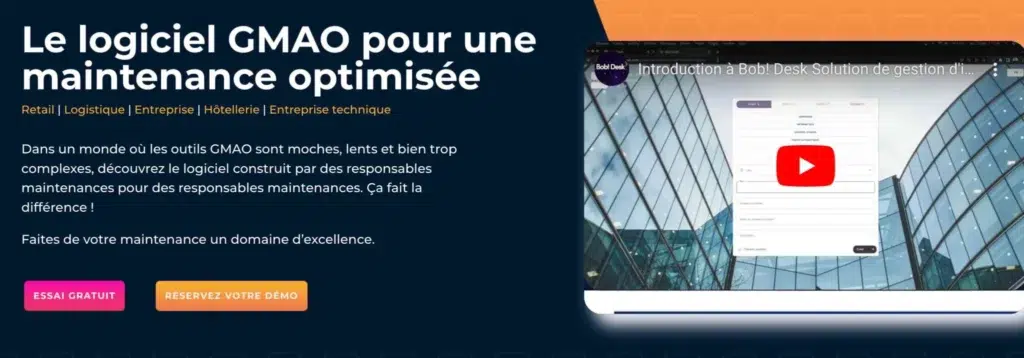
Bob Desk is a software solution designed to simplify maintenance and technical service management within businesses. This CMMS, or Computerized Maintenance Management System, offers a range of features that address the needs of maintenance managers and technicians. Here is a detailed overview of Bob Desk’s features and benefits.
logiciel gestion intervention bobdesk 2048x715 1
  • Bob Desk features
Work order management: Bob Desk enables users to create, schedule and track preventive and corrective maintenance work orders. Users can easily assign tasks, monitor progress and close interventions once they are completed.
Intervention planning: The platform provides tools for effectively scheduling interventions according to technician availability and task priorities, thereby reducing equipment downtime.
Inventory management: Bob Desk helps manage spare parts inventories, with features for stock tracking, low-stock alerts, and purchase order and supplier management.
Asset management: The software maintains a detailed register of equipment and facilities, including maintenance history, technical specifications and warranties associated with each asset.
Reporting and analytics: Bob Desk offers advanced reporting capabilities for generating customized reports on equipment performance, maintenance costs, intervention efficiency and more.
Mobile application: A mobile application allows technicians to access information and update intervention statuses directly from the field, improving communication and responsiveness.
Safety and compliance: The platform helps ensure compliance with safety regulations and industry standards through automatic inspection reminders and safety procedure documentation.
Intuitive user interface: Bob Desk is designed to be easy to use, with a clear and intuitive user interface that reduces the training time required for new users.
  • Benefits of Bob Desk
Resource optimization: By enabling effective task planning and management, Bob Desk helps companies optimize the use of human and material resources, thereby reducing costs.
Improved productivity: With tools designed to minimize equipment downtime and speed up interventions, Bob Desk directly contributes to improving company productivity.
Reduced costs: Accurate inventory management and the proactive maintenance enabled by Bob Desk can significantly reduce costs associated with emergencies and unnecessary parts purchases.
Real-time access: The ability to track interventions in real time and access up-to-date data from any device helps managers make informed decisions quickly.
Improved compliance: By monitoring safety standards and regulations, Bob Desk reduces the risk of non-compliance and potential penalties.
Easy integration: Bob Desk can often be integrated with other management systems used within the company, such as ERP platforms, for more consistent and integrated operations management.

How to choose maintenance work order management software

Choosing maintenance work order management software, or a CMMS, is crucial for optimizing a company’s maintenance operations. Here are the main criteria to consider when selecting the solution best suited to your needs.
  • Compatibility and integration
The software should be easy to integrate with the other IT systems already used by the company, such as ERP systems, human resources management tools and inventory management systems. Effective integration makes it possible to centralize data and improve communication between different departments.
  • Specific features
It is essential to choose software that offers the specific features required by your maintenance operations. Important features to look for include:
  • intervention planning and tracking;
  • spare parts inventory management;
  • mobile access for field technicians;
  • performance reports and analytics;
  • technical documentation and operating manual management.
  • Ease of use
CMMS software should be intuitive and easy to use for everyone, from maintenance managers to technicians. A clear user interface and accessible features reduce the required training time and improve employee adoption of the software.
  • Scalability
The chosen software must be scalable, meaning that it must be able to adapt as the company grows. Whether you need to increase the number of users, manage more sites or add new features, the software should evolve with your needs without requiring a complete replacement.
  • Support and maintenance
Check the level of support offered by the software provider. Effective technical support is essential for quickly resolving any issues that may arise. You should also make sure that the software is updated regularly to benefit from the latest improvements and ensure data security.
  • Cost
Software cost is also an important factor. You should assess the total cost of ownership, which includes not only the purchase price or subscription fee, but also implementation, training, maintenance and potential upgrade costs. Choose a pricing model that matches the size and requirements of your organization.
  • References and use cases
Before making a decision, it may be useful to review case studies or testimonials from other companies similar to yours that use the software. This can give you a better idea of how the solution could work in your own environment.
Choosing the right maintenance work order management software is essential for optimizing maintenance operations, reducing costs and improving efficiency. Solutions such as Nomadia Field Service, Synchroteam and Bob Desk offer advanced features that can adapt to a wide range of business needs, improving technician productivity and customer satisfaction. Investing in the right software is therefore essential for any company looking to modernize and streamline its maintenance operations.

     Projet, demande de démonstration ou d’essai gratuit ?

Frequently Asked Questions

FAQ – The Most Frequently Asked Questions About Nomadia

Why Choose Nomadia?

As France’s leading publisher of Smart Mobility SaaS solutions, Nomadia supports more than 175,000 field professionals every day. Our solutions are easy to use, quick to deploy, and deliver significant and immediate return on investment.

Drawing on the expertise of both a software publisher-integrator and a consulting firm, Nomadia’s teams provide tailored support, from data consulting to the deployment of mobile devices. Finally, our technical support team is available 24/7 to assist you.

Who Are Nomadia Solutions Designed For?

Nomadia solutions support the digital transformation of all mobile professionals: field sales representatives, delivery drivers, technicians, auditors, healthcare workers, inspectors, service providers, security patrol officers, experts, and more.

Whether for SMEs or large enterprises, our solutions adapt to businesses of all sizes and across all industries.

How Much Does It Cost?

Nomadia Delivery offers transparent and flexible pricing, which primarily depends on the number of users (for example, planners and dispatchers) rather than a fixed cost per parcel.

Thanks to this model, you can control your delivery costs based on the number of resources (users) involved in route management, providing great flexibility to adjust your subscription according to the size of your fleet and your operational needs.

Is It Compatible with My Current ERP System?

Yes! Nomadia Delivery has been designed to integrate quickly and easily into your existing environment thanks to our powerful and secure APIs. Our solution is compatible with most ERP systems on the market. API integration enables the automatic synchronization of your transport orders, customer orders, and customer information, ensuring smooth and error-free delivery tracking. The solution also offers user-friendly import capabilities with data validation controls, as well as export options in multiple customizable formats.

Is It Suitable for Our Delivery Volume?

Yes, Nomadia Delivery is ideal for companies that manage a high volume of deliveries and want to optimize their routes, create balanced territories for their drivers, and ensure precise tracking of every parcel. Nomadia Delivery adapts to fleets of all sizes!

Can Multiple Warehouses or Depots Be Managed?

Yes, our solution allows you to manage multiple warehouses or depots. It centralizes data and optimizes routes or service operations for each of them.

Is There a Limit to the Number of Stops in Route Optimizations?

No, there is no strict limit to the number of stops in route optimizations. Our solution can handle large volumes of stops and quickly calculate optimized routes.

         Project, request for a demonstration or a free trial?

nomadia logo

Geoconcept becomes Nomadia

Geoconcept brands are officially
evolving into Nomadia

nomadia logo

TourSolver becomes
Nomadia TourSolver