Maintenance Reporting Software: Importance, Tools and How to Choose

reading time : 2 min

Picture of Lucie Monnot
Lucie Monnot

Content Marketing Manager

Optimizing maintenance management is essential for ensuring the longevity and performance of equipment. Maintenance reporting software plays a key role in achieving this goal. In this article, we explore the benefits of these tools and present our top five maintenance field service software solutions available on the market. You will also learn how to choose the right maintenance reporting software and make the most of its features.

Table of contents

Top 3 logiciels gestion bons intervention maintenance

Why use maintenance reporting software?

Using maintenance reporting software has become essential for improving the efficiency and performance of maintenance activities. How does it help?
 
  • Data centralization: Maintenance reporting software centralizes all maintenance-related information on a single platform. This makes information easier to find and prevents data loss.
  • Improved communication: The software facilitates communication between the various stakeholders involved in maintenance, including technicians, managers and suppliers. Information is shared in real time, enabling faster and more effective decision-making.
  • Real-time tracking: Maintenance reporting software allows users to monitor equipment status, intervention progress, spare parts inventories and more in real time. This improves responsiveness and helps anticipate potential issues.
  • Time savings: Automating certain tasks, such as intervention scheduling and report generation, saves a considerable amount of time. Technicians can focus on their core activity: maintaining equipment.
  • Data analysis: Maintenance reporting software often includes data analysis features. These make it possible to identify trends, measure maintenance performance and find opportunities for improvement.

Should you choose free or paid maintenance reporting software?

When choosing maintenance reporting software, it is essential to weigh the advantages and disadvantages of free and paid solutions. Your company’s specific needs, budget and objectives will determine which type of software is most suitable.
  • Free maintenance reporting software

Advantages

Cost: The main advantage of free software is, of course, its cost. It allows small businesses and startups to access maintenance tools without putting pressure on their budgets.
Accessibility: Free software is generally easy to install and use, with basic features that may be sufficient for simple maintenance reporting.
Flexibility: Free software can be an excellent temporary solution for testing features and assessing actual requirements before moving to a more comprehensive paid version.

Disadvantages

Limited features: Free versions often offer basic features and may lack the advanced tools required for complex maintenance operations.
Limited support: Technical assistance and customer support for free software are often limited, which can create difficulties in the event of bugs or customization requirements.
Security: Data security may be less robust in free versions, which can create risks for companies handling sensitive information.
  • Paid maintenance reporting software

Advantages

Advanced features: Paid software generally offers advanced features such as inventory management, automated scheduling, predictive analytics and integrations with other systems.
Technical support: Users of paid software often benefit from dedicated technical support, ongoing assistance and regular updates, ensuring optimal performance.
Security and compliance: Paid solutions generally place greater emphasis on data security and compliance with regulatory standards. This is particularly important for large companies and organizations operating in regulated industries.

Disadvantages

Cost: The initial cost and recurring fees associated with paid software may be prohibitive for some companies, particularly smaller businesses.
Complexity: Paid solutions can be more complex to implement and may require additional employee training.
Commitment: Some paid software solutions require long-term contracts, which can represent a significant financial commitment.
Even so, paid solutions are generally the most powerful and useful tools for managing maintenance reports. To help you find the right solution, we have created a list of the five best software solutions on the market.

Top 5 maintenance reporting software solutions

Effective maintenance management requires robust tools for tracking interventions, scheduling tasks and analyzing data. Here is an overview of the five best maintenance reporting software solutions currently available.
  • Nomadia Field Service
Nomadia Field Service is a comprehensive maintenance management solution offering advanced features to optimize field interventions. It enables users to plan, track and analyze maintenance operations with a high degree of accuracy.
  • Main features
  • Automated intervention scheduling
  • Real-time tracking of field teams
  • Inventory and spare parts management
  • Detailed reporting and analytics
  • Intuitive and customizable interface
The main benefits of this maintenance and maintenance reporting software include:
  • improved productivity through automation;
  • real-time visibility into operations;
  • a user-friendly interface that is easy to learn.
  • Synchroteam
Synchroteam is field service management software designed to optimize the planning and execution of maintenance tasks. It is particularly well suited to mobile teams and on-site interventions.
  • Main features
  • Intervention planning and dispatching
  • GPS tracking of technicians
  • Contract and customer management
  • Integration with ERP and CRM management systems
  • Detailed report generation
The main benefits of this maintenance management and reporting software include:
  • a mobile interface for field technicians;
  • easy integration with other business systems;
  • responsive technical support.
  • Solitech
Solitech offers a simple and effective maintenance management platform, ideal for companies looking for a solution that is quick to implement and easy to use.
  • Main features
  • Intervention and route scheduling
  • Real-time intervention tracking
  • Work order and invoice management
  • Mobile application for technicians
  • Performance and analytics reports
The main benefits of this maintenance management and reporting software include:
  • ease of use and deployment;
  • an affordable solution for SMEs;
  • an intuitive user interface.
  • Kizeo Forms
Kizeo Forms is a flexible solution for creating customized maintenance forms and managing field interventions. It is designed to simplify data collection and improve operational efficiency.
  • Main features
  • Customized form creation
  • Real-time data collection
  • Integration with ERP and CRM systems
  • Automated reports and analytics
The solution offers several benefits, including:
  • extensive flexibility and form customization;
  • ease of use and implementation;
  • affordable pricing for small businesses.
Choosing the right maintenance reporting software depends on your company’s specific needs and budget. Whether you choose a free solution such as Excel or an advanced platform such as Nomadia Field Service, it is essential to assess the features and benefits available in order to optimize maintenance management. Let’s now look at how you can identify the solution that best suits your organization.
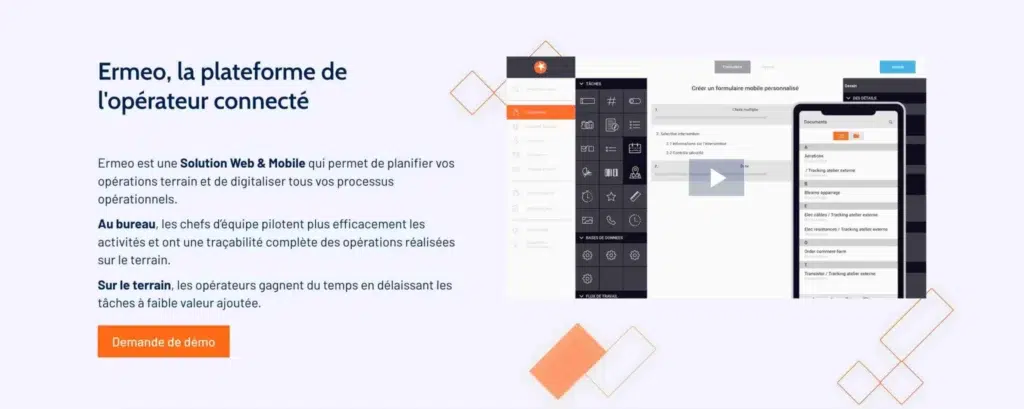
  • Ermeo
Ermeo is a maintenance management tool focused on process digitization and real-time collaboration between field teams and managers.
  • Main features
  • Digitization of forms and procedures
  • Intervention and inspection management
  • Real-time tracking and reporting
  • Integrated collaboration and communication
  • Integration with existing systems
The main benefits of this solution include:
  • improved communication and collaboration;
  • reduced paper use and process automation;
  • a mobile interface for technicians.
ermeo logiciel planning 2048x818 1

How to choose the right maintenance reporting software

  • Tip 1: Assess your company’s specific needs
Before choosing software, it is essential to understand your company’s specific requirements. These include:
Type and size of equipment: Different software solutions may be better suited to specific industries or company sizes.
Number of users: Consider how many people will use the software and whether it effectively supports team collaboration.
Nature of the interventions: Some companies may require specific features, such as field intervention management or preventive maintenance management.
  • Tip 2: Consider ergonomics and ease of use
Maintenance software should be intuitive and easy to use to ensure rapid adoption by teams. Clear user interfaces and easy-to-understand features are essential.
User interface: Make sure that the interface is user-friendly.
Support and training: Check that the provider offers adequate support and training for users.
  • Tip 3: Consider costs and return on investment
Cost is an important factor when choosing software. It is essential to compare the software price with the benefits it provides in terms of reduced maintenance costs and improved productivity.
Initial cost and subscriptions: Assess the purchase price or subscription cost of the software.
Additional fees: Consider the costs of training, technical support and updates.
ROI: Calculate the return on investment in terms of increased efficiency and reduced equipment downtime.
  • Tip 4: Check compatibility and integration
Make sure that the chosen software can integrate with your existing systems, including ERP and CRM platforms. Compatibility with other management software can simplify processes and prevent duplicate data entry.
  • Tip 5: Read reviews and request demonstrations
Before making a decision, read reviews from other users and request software demonstrations. This will give you a better understanding of the solution’s performance and suitability for your needs.

How to maximize the use of your maintenance reporting software

To get the most from your maintenance reporting software, start by providing thorough and continuous training for all users. It is essential that everyone understands the software’s features and interface, from technicians to managers. Provide support resources, such as user guides and responsive technical assistance, to resolve issues quickly and answer questions.
 
Adapt the software to your specific requirements by customizing dashboards, reports and notifications. Create standardized report templates to ensure consistency and make data compilation easier. This supports better understanding and faster adoption by users.

Integrate your maintenance software with other systems, such as ERP and CRM platforms, to ensure optimal coordination and a seamless workflow. APIs and connectors can automate data transfers, reducing errors and the time spent on manual data entry.

Automate as many processes as possible, including maintenance intervention scheduling and the sending of notifications and alerts. This ensures that all tasks are planned proactively and helps prevent unexpected equipment failures.

Use the software’s analytical capabilities to monitor key performance indicators, such as mean time between failures (MTBF) and mean time to repair (MTTR). Generating detailed reports allows you to analyze trends, identify recurring issues and make decisions based on concrete data. These reports can be used to improve maintenance processes and justify investments in new equipment.
 
Encourage users to provide feedback on the software and its features. Use this feedback to identify areas for improvement and adapt the software to changing needs. Keep the software up to date with the latest versions to benefit from new features and security improvements.
Use user feedback and analytical data to support continuous improvement projects, optimize processes and adjust maintenance strategies according to the results achieved.
Using effective maintenance reporting software can transform intervention management, improve productivity and reduce costs. Whether you choose a free solution to get started or paid software with advanced features, you must select the tool that best meets your company’s specific needs.
By following our recommendations, you will not only be able to choose the right software, but also maximize its use to ensure optimal maintenance and strong regulatory compliance. Adopting these modern tools is a strategic investment in the long-term reliability of your equipment and the overall performance of your business.
 

     Projet, demande de démonstration ou d’essai gratuit ?

Frequently Asked Questions

FAQ – The Most Frequently Asked Questions About Nomadia

Why Choose Nomadia?

As France’s leading publisher of Smart Mobility SaaS solutions, Nomadia supports more than 175,000 field professionals every day. Our solutions are easy to use, quick to deploy, and deliver significant and immediate return on investment.

Drawing on the expertise of both a software publisher-integrator and a consulting firm, Nomadia’s teams provide tailored support, from data consulting to the deployment of mobile devices. Finally, our technical support team is available 24/7 to assist you.

Who Are Nomadia Solutions Designed For?

Nomadia solutions support the digital transformation of all mobile professionals: field sales representatives, delivery drivers, technicians, auditors, healthcare workers, inspectors, service providers, security patrol officers, experts, and more.

Whether for SMEs or large enterprises, our solutions adapt to businesses of all sizes and across all industries.

How Much Does It Cost?

Nomadia Delivery offers transparent and flexible pricing, which primarily depends on the number of users (for example, planners and dispatchers) rather than a fixed cost per parcel.

Thanks to this model, you can control your delivery costs based on the number of resources (users) involved in route management, providing great flexibility to adjust your subscription according to the size of your fleet and your operational needs.

Is It Compatible with My Current ERP System?

Yes! Nomadia Delivery has been designed to integrate quickly and easily into your existing environment thanks to our powerful and secure APIs. Our solution is compatible with most ERP systems on the market. API integration enables the automatic synchronization of your transport orders, customer orders, and customer information, ensuring smooth and error-free delivery tracking. The solution also offers user-friendly import capabilities with data validation controls, as well as export options in multiple customizable formats.

Is It Suitable for Our Delivery Volume?

Yes, Nomadia Delivery is ideal for companies that manage a high volume of deliveries and want to optimize their routes, create balanced territories for their drivers, and ensure precise tracking of every parcel. Nomadia Delivery adapts to fleets of all sizes!

Can Multiple Warehouses or Depots Be Managed?

Yes, our solution allows you to manage multiple warehouses or depots. It centralizes data and optimizes routes or service operations for each of them.

Is There a Limit to the Number of Stops in Route Optimizations?

No, there is no strict limit to the number of stops in route optimizations. Our solution can handle large volumes of stops and quickly calculate optimized routes.

         Project, request for a demonstration or a free trial?

nomadia logo

Geoconcept becomes Nomadia

Geoconcept brands are officially
evolving into Nomadia

nomadia logo

TourSolver becomes
Nomadia TourSolver