Optimize your maintenance tracking with Excel
- 01/03/2024
- 10:49
reading time : 2 min

Content Marketing Manager
A well-executed maintenance tracking allows a company to improve its operational efficiency, as well as the lifespan of its equipment. Excel emerges as an effective tool for tracking your maintenance interventions. But how do you implement it? And what are its limits?
Tables of Contents

Why Track Maintenance Interventions?
Proper maintenance management offers several advantages:
- Operational reliability: Maintenance management helps identify and resolve issues before they become critical.
- Compliance with standards: Non-compliance with regulatory standards is a serious offense for any company. By tracking maintenance interventions, you ensure that your equipment remains compliant.
- Equipment lifespan: Regular maintenance tracking allows you to be aware of equipment conditions. You can anticipate part changes more frequently to avoid total machine replacement, thus saving costs!
Maintenance interventions are crucial for all businesses!
Ensure effective interventions with a suitable tool!
Why Use Excel for Maintenance Intervention Tracking?
As you may have understood, if you want to optimize your operations, you need to manage your maintenance interventions effectively. Excel proves to be an interesting tool to meet your needs. Why?
- A known and intuitive tool
Excel is easy to use thanks to its intuitive interface. It’s also a tool familiar to many people, so there’s no training required.
- Customization tailored to your needs
With Excel, customization is at your fingertips. Each company has specific maintenance tracking needs, and Excel offers the flexibility to create tailored spreadsheets.
- Data centralization for a global view
Data centralization is a major advantage of Excel. By gathering all maintenance intervention information in one place, you can quickly access an overview, facilitating decision-making.
How to Track Maintenance Interventions with Excel?
- Centralize the data
Start by centralizing all maintenance intervention information in a dedicated Excel sheet. This provides an overview and simplifies access to specific details.
- Structure the columns
Organize your Excel sheet by defining clear and relevant columns. Include categories such as intervention date, nature of maintenance, personnel involved, and parts used.
- Use smart filters
Utilize Excel’s filter features to quickly sort data according to different criteria. This makes it easier to find specific information and improves the readability of intervention tracking.
- Incorporate calculation formulas
Automate the calculation of intervention durations, associated costs, or maintenance frequencies using Excel formulas. This provides relevant indicators for evaluating maintenance service performance.
- Add charts
Visualize trends and performance using Excel charts. Visual representations aid data understanding and help in making better decisions.
- Ensure regular backup
Remember to regularly back up your Excel file. This ensures data security and prevents information loss.
- Facilitate shared access
Optimize collaboration by allowing shared access to the Excel file. This promotes transparency and communication among team members.
And a Planning Tool?
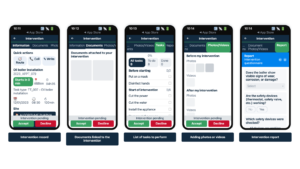
In maintenance intervention tracking, Excel quickly reaches its limits. Managing multiple tasks becomes complex as activities expand. Its limited capacity hampers traceability of actions and effective intervention management. The use of a manual tool increases the risk of human errors in data entry and analysis, compromising maintenance process accuracy.
A dedicated tool obviously comes with a higher cost than Excel. However, the time and performance gains are significant. A dedicated planning tool allows:
- Better visibility: Proper planning provides a clear view of upcoming interventions, enabling proactive resource management.
- Optimal resource management: These tools simplify team and equipment assignments, maximizing operational efficiency.
- Detailed intervention history: Maintaining accurate history facilitates post-intervention analysis and trend identification for better decision-making.
- Improved responsiveness: Well-established planning allows for quick response to emergencies without disrupting current operations.
- Cost optimization: Avoiding emergency repairs and planning effectively helps reduce maintenance costs, promoting more balanced budget management.
Choose efficiency and reliability for maintenance intervention tracking.
Contact Nomadia today and discover how our planning tool can transform your operational management.
Frequently Asked Questions
FAQ – The Most Frequently Asked Questions About Nomadia
Why Choose Nomadia?
As France’s leading publisher of Smart Mobility SaaS solutions, Nomadia supports more than 175,000 field professionals every day. Our solutions are easy to use, quick to deploy, and deliver significant and immediate return on investment.
Drawing on the expertise of both a software publisher-integrator and a consulting firm, Nomadia’s teams provide tailored support, from data consulting to the deployment of mobile devices. Finally, our technical support team is available 24/7 to assist you.
Who Are Nomadia Solutions Designed For?
Nomadia solutions support the digital transformation of all mobile professionals: field sales representatives, delivery drivers, technicians, auditors, healthcare workers, inspectors, service providers, security patrol officers, experts, and more.
Whether for SMEs or large enterprises, our solutions adapt to businesses of all sizes and across all industries.
How Much Does It Cost?
Nomadia Delivery offers transparent and flexible pricing, which primarily depends on the number of users (for example, planners and dispatchers) rather than a fixed cost per parcel.
Thanks to this model, you can control your delivery costs based on the number of resources (users) involved in route management, providing great flexibility to adjust your subscription according to the size of your fleet and your operational needs.
Is It Compatible with My Current ERP System?
Yes! Nomadia Delivery has been designed to integrate quickly and easily into your existing environment thanks to our powerful and secure APIs. Our solution is compatible with most ERP systems on the market. API integration enables the automatic synchronization of your transport orders, customer orders, and customer information, ensuring smooth and error-free delivery tracking. The solution also offers user-friendly import capabilities with data validation controls, as well as export options in multiple customizable formats.
Is It Suitable for Our Delivery Volume?
Yes, Nomadia Delivery is ideal for companies that manage a high volume of deliveries and want to optimize their routes, create balanced territories for their drivers, and ensure precise tracking of every parcel. Nomadia Delivery adapts to fleets of all sizes!
Can Multiple Warehouses or Depots Be Managed?
Yes, our solution allows you to manage multiple warehouses or depots. It centralizes data and optimizes routes or service operations for each of them.
Is There a Limit to the Number of Stops in Route Optimizations?
No, there is no strict limit to the number of stops in route optimizations. Our solution can handle large volumes of stops and quickly calculate optimized routes.
Project, request for a demonstration or a free trial?